 |
The eTray FAQ
|
|
|
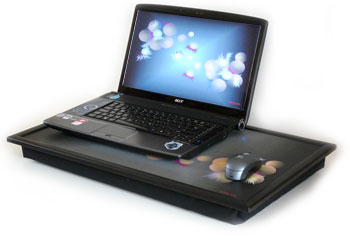
The FAQ list below contains answers to some basic questions you might want to ask, and you might find that it is faster to look here before contacting us: About eTrayQ. Can't I just use my laptop on my lap - why do I need an eTray?. A. There are two basic problems with using a laptop computer on your lap and these become very obvious when you first try it. The first is that the computer gets uncomfortably hot after a very short period of time, and you may eventually have to put it down. The second is that you will have to use the touch pad to operate the machine. An eTray will overcome both of these problems and makes it possible to use your laptop with a mouse for extended periods of time in comfort. Q. You mentioned that there may be health effects associated with laptop use? A. Some research has indicated that using a portable computer on the knees could have an effect on reducing male fertility. This is because of the heat build up both from the machine, but also a result of sitting with the knees close together for long periods of time. Q. So does eTray provide an answer? A. Using an eTray will allow men to adopt a more natural posture while using the laptop and sit with their legs apart. And, of course, the tray and lap pad provide additional insulation that keeps the heat of the machine away from sensitive areas. Q. What is the "screen layer" for? A. When we thought about this we realized that this research focused only on the effect of heat and did not consider any potential effect from the electromagnetic radiation emitted from the computer. Modern computers operate at microwave frequencies, and almost all of the latest laptops have built in radio transmitters for their Wi-fi and Bluetooth connections. This means that they are continuously emitting radio waves when they operate and with a laptop these pass through our bodies. Nobody seems too sure about whether this is a problem, but a leading UK Government adviser has expressed concern about potential health risks to children using wi-fi enabled computers.The screen layer is a layer of aluminium foil that should help to reflect some of these rays away from the lower part of the body. Q. What do you have against touch pads? A. Despite recent advances in touch screen technology, both the Windows and Mac user interface were originally designed for use with a mouse. A mouse has been part of the design since the very early development of the WIMP interface in the '70s. The touch pads fitted to laptops are poor, low resolution, substitutes that are really only suited for use in an emergency. Yes, you can get used to them, but in my opinion they will never be as quick, fluid or precise as a mouse. Q. Does that matter? A. It does if you use your laptop creatively for extended periods of time. Struggling without the benefit of a mouse can have a severe effect on your productivity and be very tiring. A lot of people simply resort to using a table for their laptop. But this is not the most comfortable option, particularly if you are sitting on a couch and using it on a coffee table. That particular combination is a recipe for a lower back injury that could plague you for the rest of your life. Q. Can you fit a mouse to any laptop? A. All of the laptops I have seen have a USB port fitted to them for use with a USB mouse. You can use a Bluetooth wire free mouse with most machines. Q. What does the beanbag part of the eTray do? A. It does two things. The first is to insulate you from the heat generated by the laptop. The second is that it is soft and conforms exactly to the shape of your lap. There is nothing hard and nothing to dig in, and that make it extraordinarily comfortable for extended computing sessions. Q. Does using an eTray make a difference to the way that you use your laptop? A. Yes. It's something that you need to try to truly appreciate, but the combination of an eTray and a wire free Internet connection turns your laptop into much more of a home appliance. You tend to keep it switched on and available and use it much more casually on an as needed basis. About the Deck DesignsQ. What can you tell me about the deck designs? A. Immediately after first thinking about producing eTrays, it occurred to us that the decks could represent the biggest opportunity to display interesting artwork since the demise of the Long Playing record. They are a nice big blank area with a format similar to a cinema screen - plenty of opportunity for interesting designs, and it seemed like an opportunity too good to miss. Q. Apart from the visual appeal, are there any other benefits? A. They are all going to be limited edition designs, and we think that will make them collectable and this should help preserve the owner's initial investment. This comes out of the fact that this is a product designed very much with eBay in mind, and of course there are a lot of collectors on eBay. Q. So how many different designs are there? A. We are hoping to add to them continually. Initially this will be with our own work, but we are also thinking of inviting other artists and photographers to contribute their work. Q. Have you produced any in plain colours yet? A. Yes - you can order one here. Q. I have special requirement for an oversized tray - can you produce custom designs? A. Get in contact - we may be able to help. |
|